Cricbet99 New ID Desk, 24x7 Deposit from ₹100 18+

Cricbet99 Login Card: Secure Mobile Number and Password Entry

Get the Cricbet99 Login Pair From the 24x7 Desk

Two fields, then reCAPTCHA runs under the form. Forgot the password? The desk handles it under Password Issue. Adults 18+ only.

Cricbet99 login · log in from your phone

Cricbet99 Login — Type Your Mobile Number, Then the Password, Safely

Cricbet99 login on a phone works like this: the top box takes your moible number or the desk user name, the lower box takes the password, and Login sends both. Without an account, tap the button under it, Login with Demo ID, to see the Cricket and Casino menus on a zero balance while the desk sets up your own ID.

Fresh Cricbet99 Mirror Link From the 24x7 Desk Locked Out? Cricbet99 Password Issue Desk

Mobile number then password. One window, one ID, a Demo ID too, beside a woman holding her phone

What the Official Cricbet99 Login Window Asks You to Fill

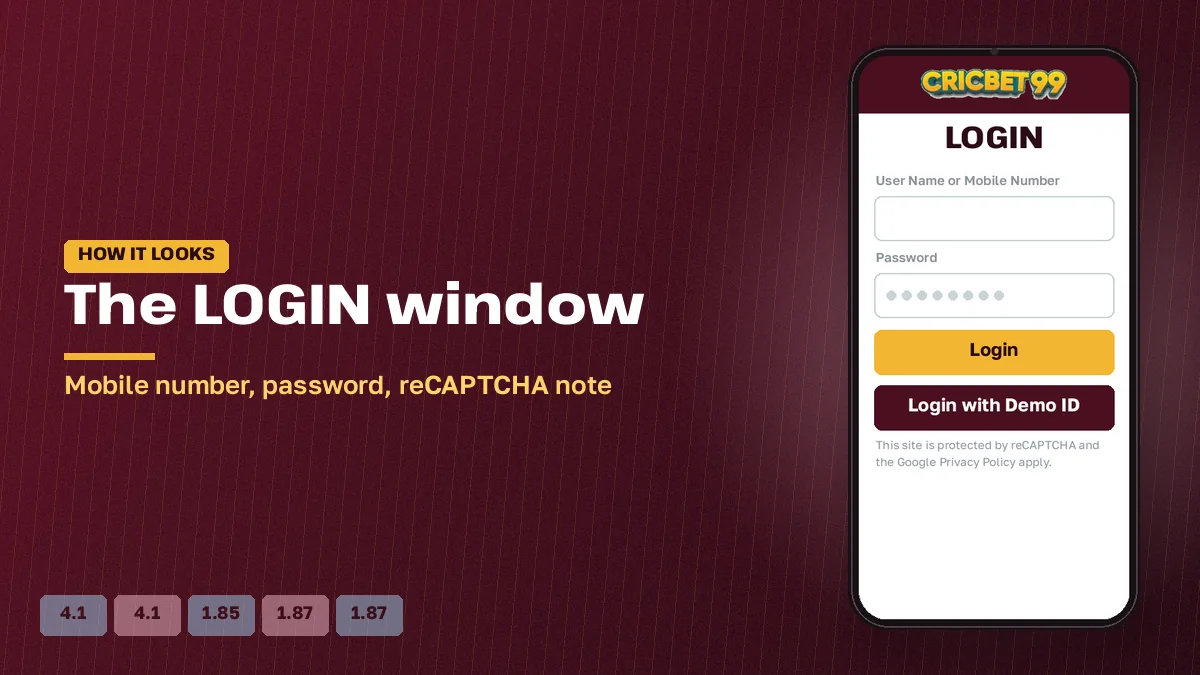
Short form. Five parts, top to bottom, and only two of them take typing, which is why a Cricbet99 login that fails is almost always about what went into those two boxes rather than anything hidden elsewhere on the screen.

User Name or Mobile Number
The first box. It accepts either the user name the Cricbet99 desk sent you or the mobile number tied to that ID.
Password
The second box, masked as you type. Case matters, so copy it exactly from the desk message.
Login
Checks the user name and password together, then opens the Cricbet99 lobby showing your balance.
Login with Demo ID
The lower button. It ignores whatever sits in the boxes and opens a lobby whose balance reads zero.
Fine print at the foot
One sentence naming reCAPTCHA. Below it come Download .apk, Contact On Whatsapp and Share This Apk to Friend, which belong to other jobs.
  • The user name or mobile number from your Cricbet99 ID message
  • The password, copied character for character
  • A working mirror address, because the old bookmark may be dead

Cricbet99 Login Inputs Side by Side: Real ID, Demo ID, App, Fast View

Same window, three ways in. The table shows what goes where for each Cricbet99 route.

RouteFirst fieldPassword fieldButton to press
Real Cricbet99 IDUser name or mobile numberPassword from the deskLogin
Demo look-aroundLeave emptyLeave emptyLogin with Demo ID
Cricbet99 app loginSame user name or mobile numberSame passwordLogin, inside the APK
After a resetUnchangedNew password the desk sendsLogin

Cricbet99 ID Login and App Login Words, Explained by the Official Form

Three searches, one Cricbet99 screen. The plain cricbet99 login query is the widest, typed by whoever wants the two boxes and nothing else. Cricbet99 id login usually comes from someone who already holds an ID from the desk and wants the field that takes it. Cricbet99 app login is searched by people who installed the APK and are unsure whether the phone app wants a different password. It does not. One account, one password.

Cricbet99 login order, typed into the secure two-field form

The cricbet99 login sequence never changes, whichever mirror you open:

  1. User name or mobile number in the top box
  2. Password in the box under it
  3. Login to send them; the Demo ID button below is only a zero-balance tour

Cricbet99 id login fields matched to the official desk message

A cricbet99 id login uses exactly what the desk message holds, nothing more:

Username line
Goes in the first field, or use the mobile number instead.
Password line
Goes in the second field, then change it after the first sign-in.

Cricbet99 app login on the APK, with the same trusted password

Cricbet99 app login searches often come from people who fetched the APK through the Download .apk button and expected a fresh registration screen. There is none. The installed file opens to the LOGIN heading, and if a reset ever replaces the password, the APK wants the replacement as well.

Reading the Cricbet99 Login Screen on a Phone, a Quick Tour

Open a working Cricbet99 mirror on a phone and the top bar shows Signup and Login beside Rules and the search icon. Tap Login. A window slides up with a heading that just says LOGIN, and the two boxes sit right under it.

The first box carries the label User Name or Mobile Number. Most people type the mobile number, because it is easier to remember than a user name made by someone else, and the Cricbet99 form treats both the same way once they belong to the same ID. Under it, the Password box. Nothing fancy.

Then the two buttons. Login is the one for account holders. Login with Demo ID sits beneath it and does not read either box at all, which surprises people who type somehing first and then press it (the typed text is simply ignored).

Below the buttons is a small grey line about reCAPTCHA. That line is the only security text on the form. On most phones the check runs without asking you to pick pictures, though in practice a slow connection can make it take a second or two longer.

Further down the same window are three more buttons: Download .apk, Share This Apk to Friend and Contact On Whatsapp. They are not part of the sign-in itself. The APK route is covered on the Cricbet99 app download page; for the login, you only need the top half.

On a desktop the Cricbet99 window looks the same, only wider, with the fields stacked in the centre of the screen. Nothing moves around between phone and computer, so once you know the order (name or number, password, Login) you know it everywhere.

The LOGIN window. Mobile number, password, reCAPTCHA note, shown on a phone sign-in window
Mock phone screen with the Cricbet99 LOGIN heading, both entry boxes, two stacked buttons and the reCAPTCHA fine print at the foot.

Cricbet99 Login Step by Step, From the Desk Message to a Live Lobby

Here is the whole run for a first sign-in, assuming the desk has already sent your ID.

  1. Open the desk message. It holds three things: a user name, a password and a working link. Keep it open in the chat app.
  2. Tap the working link. Your browser opens a Cricbet99 mirror, not the address you remember from last year.
  3. Tap Login in the top bar, next to Signup. The LOGIN window appears.
  4. In User Name or Mobile Number, type the user name from the message, or the mobile number you gave the desk. Either works for the same ID.
  5. In Password, type or paste the password. Watch for a space that sneaks in at the end of a paste; it counts as a character.
  6. Press Login. reCAPTCHA runs under the form, and a correct pair takes you straight to the Cricbet99 lobby, sports menu across the top.
  7. Before the first bet, replace the chat password with one nobody else has seen (the reason sits in the habits section further down).

That last step is the one people skip, and probably the one that matters most. Seven steps, roughly a minute if the link is fresh.

What you see after pressing Login tells you whether it worked. A real Cricbet99 sign-in lands on the lobby with HOME and the sports menu across the top (Cricket, Football, Tennis and the rest, listed on the Cricbet99 home page), and your balance shows instead of a zero. If the window is still on screen with your entries in it, the pair was not accepted; go back to step five before trying anything else.

A worked case. Say the desk sent the user name in capitals and you typed it in lower case on a phone that auto-corrects the first letter. The password is right, the link is fresh, and the form still refuses. Switching the first field to the mobile number on that Cricbet99 ID gets you in, because a number has no case to get wrong. Small thing. It saves a message to the desk.

Cricbet99 Login With Demo ID or Your Real Account: the Safe Choice

Both buttons sit in the same Cricbet99 window, a few pixels apart. They lead to very different places. Different rooms, really.

Cricbet99 Demo ID login, a free look around

Press Login with Demo ID and you land in the Cricbet99 lobby with a zero balance. You can open the market board, see how back and lay prices sit side by side, and walk through the casino tables. Nothing you do there touhes money, because there is none. It suits someone who has not messaged the desk yet and wants to see the layout first.

Cricbet99 real ID login, your verified balance

Press Login after filling both fields and you see your own account. Deposits you have made, your open bets, the withdrawal option. This is the only route where the user name or mobile number and the password matter, and the only one where anything real happens. The minimum deposit and withdrawal are both ₹100, per the notice on the Cricbet99 sign up page.

PointDemo IDReal Cricbet99 ID
Fields to fillNoneTwo
BalanceZeroYour own
Needs the desk firstNoYes, the desk makes the ID
Can bet with moneyNoYes

Cricbet99 Login Problems and the Fast Fixes for Each One

Six situations cover nearly every refused Cricbet99 sign-in we hear about. Each has a fix you can try before writing to anyone.

The address does not open at all
Old Cricbet99 addresses get blocked by Indian internet providers. Ask the desk for the current working link instead of retyping the old one.
The form refuses the pair
Re-copy the password from the desk message, check for a trailing space, and try the user name instead of the mobile number (or the other way round).
Password gone from memory and from the chat
Scrolling the Cricbet99 form for a reset link wastes time, since there is none. Tap the Password Issue department at the desk and a replacement arrives in the thread.
Zero showing where your money should be
That is the Demo ID lobby, which belongs to nobody. Sign out, reopen LOGIN, fill both boxes and press the upper button.
You type the mobile number with extra digits
Some phones paste the number with a country code or spaces. Type the plain number as you gave it to the desk, or use the user name.
The app and the browser disagree
They share one password. If one works and the other does not, the stale one is probably an old saved password; type it fresh.

Two failed tries is a good point to stop. Guessing passwords on the Cricbet99 form does not fix anything, and the desk can tell you in one reply whether the ID is active, which link works and whether the password needs a reset. Pick the department that fits: Password Issue for a lost or refused password, New ID if you never had one. Short message, quick answer.

A second worked case, because it comes up a lot. Someone saves a Cricbet99 mirror on the home screen in spring, it stops opening months later, and they assume the account is closed. It is not. The ID and password are exactly as they were; only the address was blocked. A new link from the desk, the same two fields, and the lobby opens with the same balance.

Cricbet99 App Login and Browser Login Share One Secure Password

Does the APK want its own Cricbet99 registration? No. One ID, one password, one balance, whichever screen you hold.

Cricbet99 app login inside the official APK

The APK comes from the Download .apk button in the login window or from the desk chat, since no Play Store listing has been confirmed. Once installed, it opens the same LOGIN window with the same two fields. Type the Cricbet99 user name or mobile number, then the password, and press Login. Details on getting the file are on the Cricbet99 APK page.

Cricbet99 browser login on a live mirror

In the browser you depend on the address working that day. The fields and buttons are identical, so the habit carries over. If the mirror stops opening, the account is fine; only the address changed, and the desk sends a fresh link.

One practical difference. A browser may offer to save the password, and the app may remember the session, so after a reset one of them can still hold the old Cricbet99 password while the other has the new one.

The cure is dull but it works. After any reset, open the browser, clear the saved entry for that mirror, sign in with the new password, then do the same in the app. From then on both carry the same pair. Two minutes, maybe less.

Which Address to Use for Cricbet99 Login: Latest Mirror Notes

The login window is the same everywhere, but the address in front of it is not. On 6 Nov 2026, from an Indian server, cricbet99.biz opened the exchange lobby and is the result Google lists first as Sign in - Cricbet99, while cricbet99.club opened the same lobby too (more on the Cricbet99 club login address). The same check found cricbet99.red, cricbet99.blue, cricbet99.ai, cricbet99.llc and cricbet99.live opening that lobby as well.

Others did not. cricbet99.com, cricbet99.win, cricbet99.green and cricbet99.link gave no response on 6 Nov 2026, and cricbet99.ac forwarded to a different small site. Some names, such as cricbet99.in and cricbet99.vip, are information sites using the name, not a sign-in address. Typing your Cricbet99 password into one of those would be a mistake, so look for the LOGIN window with the two fields and the Demo ID button before you type anything.

Seven endings, one Cricbet99 lobby, and the same two entries typed into each.

The full, dated list sits on the Cricbet99 link page. Treat it as a snapshot rather than a promise, because a mirror that opens today can be blocked next week, and the desk always has the current one.

Cricbet99 Login After the First Sign-In: a Trusted Password Habit

Think about where the starter password has been. It was typed by a desk agent, sent across a chat app, and now sits in a thread on your phone that anyone holding the phone can scroll. Cricbet99 asks you to replace it after the first sign-in for exactly that reason. Starter key, not a keeper.

So, a routine. Sign in, change the password, and keep the new one somewhere other than the chat thread. Next time you open the Cricbet99 login window you type the same user name or mobile number, and the new password.

Lost it anyway? It happens. There is no self-service reset in the window, so the route runs through the desk under Password Issue, which sends a fresh password; the steps are on the password reset steps for a Cricbet99 ID. After that reset, sign in once in the browser and once in the app, so neither keeps the old one.

A few habits make the next Cricbet99 login boring, in the good sense. Use a password that is not the one on your email or bank. Do not send it back to anyone in a chat, even someone who says they are from support, because the desk already has what it needs to reset it and never needs the old one from you. And if you share a phone with family, log out of the lobby when you are done, since the browser will otherwise keep the session open for whoever picks it up next. None of this is complicated. It just has to be done.

One more thing. If someone outside the desk offers to transfer or upgrade your Cricbet99 account under another name, ignore it. A Cricbet99 account works only on Cricbet99 mirrors, and the Cricbet99 home page explains why the brand is typed so many ways (cricbet 99, www cricbet99, login cricbet99) yet still means one account.

Cricbet99 Login Checklist Before You Tap Login, a Quick Pass

Thirty seconds. Then press Login.

  • The heading reads LOGIN and nothing on the form asks for an email, an OTP or a bank detail.
  • The mirror in the address bar arrived from the desk this week, not from a saved shortcut.
  • The first field holds your Cricbet99 user name or the mobile number on that ID.
  • The password has no extra space at the end.
  • Your thumb is on the upper of the two buttons, the one marked Login.
  • You will change the password straight after a first sign-in.
  • If anything fails twice, you message the 24x7 desk instead of guessing.
  • For a first look without an account, you use Login with Demo ID and leave both fields empty.
  • The page in front of you is the Cricbet99 window, not an information site that only borrows the name.

Other ways people type the Cricbet99 sign-in

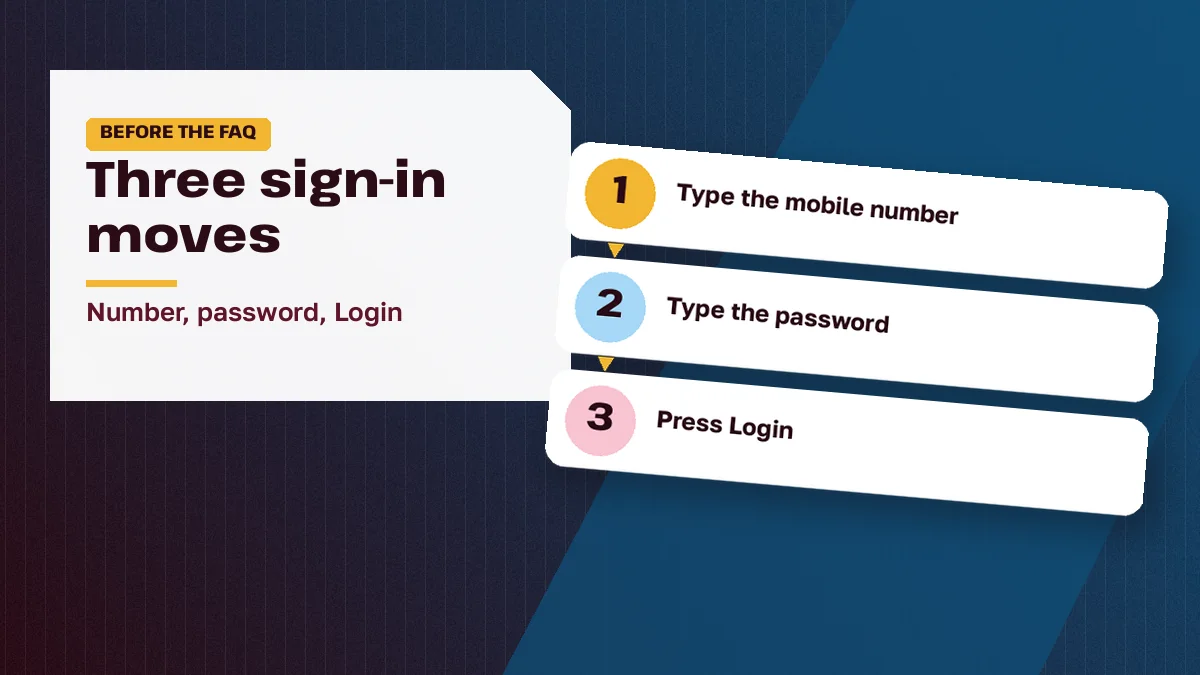
Three sign-in moves. Number, password, Login, shown on numbered step cards
Three numbered steps of the Cricbet99 login: type the mobile number, type the password, press Login.

Cricbet99 Login FAQ: Real Answers on Sign Up, Problems and Safety

Can I sign up from the Cricbet99 login window?

Not directly. The login window only signs in an existing ID or opens a Demo ID. A new Cricbet99 account is made by the desk: you message it, and it sends a user name, a password and a working link, which you then type into the two login fields.

Why is my Cricbet99 login not working?

Usually one of three things: an old blocked address, a mistyped password, or the Demo ID button pressed by mistake. Get a fresh link from the desk, copy the password again without a trailing space, and press Login. If it still fails, ask the desk under Password Issue.

Is cricbet99 login the official Cricbet99 sign-in?

Cricbet99 login is the sign-in window on the Cricbet99 exchange, with one field for user name or mobile number and one for the password. Several mirror addresses show that same window, and the desk sends the one that works today, so trust the window and the desk link over any search result.

Is it safe to use the Cricbet99 login?

The window runs reCAPTCHA under the form, and the lobby footer states a protected, encrypted connection. Safety also depends on you: type the password only into the real LOGIN window from a desk link, change the first password after signing in, and never share it with anyone outside the desk.

Does my Cricbet99 ID work on every mirror and in the app?

Yes. The user name or mobile number and password the desk gave you open the same balance on cricbet99.biz, on cricbet99.club or on whichever mirror the desk sends next, and inside the APK too. A blocked address changes nothing in the account. Other brands cannot read it, and no outsider can move it.

How does the WhatsApp desk help with Cricbet99 login?

The desk makes new IDs, sends the current working link when an address stops opening, and resets a forgotten password under the Password Issue department. It runs 24x7, and its chat opens on a tap from the support page, so you never need to guess a mirror or a password yourself.